ARI (Auto Repair Software)
- 4.3
- Rating
- 100.00K
- Installs
- Free
- Price
 Analysis by App-foxy
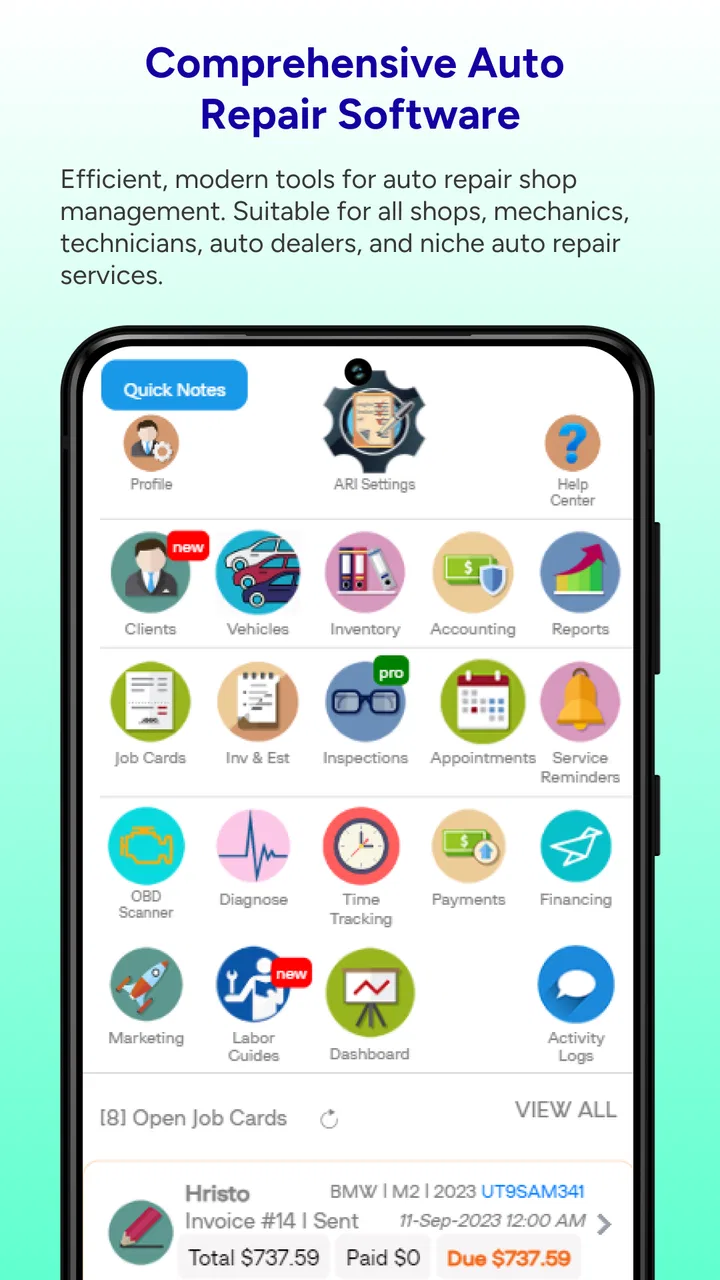
I found ARI most interesting when I stopped treating it as a simple digital notebook and used it as the central record for an auto repair job. Developed by uMob LTD, this free Auto & Vehicles app is designed to bring diagnosis, work tracking, customer details, and invoicing into one place. That sounds straightforward, but the real value appears in the handoffs between those tasks: a vehicle arrives, its problem is recorded, work is assigned, parts and labor are noted, and the bill is prepared from the same job history.
That approach makes sense for a small workshop, a mobile mechanic, or an owner who handles several vehicles and wants more structure than paper notes can provide. I would not describe it as a universal replacement for every garage-management system, though. Its usefulness depends heavily on how consistently you set up your records and how well the workflow matches the way you already work. If you want a focused repair-business tool rather than a general accounting platform, ARI is worth examining.
How ARI fits into a real repair workflow
When I evaluate ARI as part of a real repair workflow, I pay attention to the small handoffs: whether the vehicle and customer stay connected, whether a changed repair scope is easy to record, and whether the final bill still tells a clear story. Those moments reveal more than a feature checklist does. They also point to the practical checks I would make before depending on it during a busy workday.
You May Also Like

 Google Keep - Notes and lists
Google Keep’s Quiet Growth Shows the Appeal of Simpler Notes
As mobile work gets busier, Google Keep keeps winning a simple contest: capture a thought quickly, find it later, and get on with the day.

 Blood Strike: 2.5 Anniversary
Blood Strike’s Loadouts Turn Every Drop Into a Tactical Gamble
A close look at Blood Strike’s custom loadouts: how fast access to signature weapons reshapes its battle royale rhythm, rewards preparation, and narrows the gap between fights.

 Pandora - Music & Podcasts
Pandora’s Music Is Easy to Start, but Harder to Recover
Pandora’s strength is its low-effort path from a seed to a station. Its weak spot is how much confidence it asks you to place in connection, setup, and quiet recovery.

 8 Ball Pool
 Is Built on Rivalries, Rematches, and Routine
A close look at the rivalries, rematches, shared routines, and unanswered safety questions that turn a quick pool match into a persistent mobile community.

 Samsung Music
’s Quiet Strength Is Playing What You Already Own
Its reach comes less from spectacle than from dependable access to a personal library. That simplicity is both the app’s strongest retention engine and its ceiling.

 AccuWeather: Weather Radar
AccuWeather Review: A Quick, Clear Forecast for Everyday Decisions
For everyday plans, the best forecast is the one you can understand quickly. AccuWeather makes rain timing, radar, and local conditions easy to act on, with a few trade-offs.
More From Our News Desk



Starting with the vehicle and the customer
The most sensible way to use ARI is to begin before the repair itself. I would create or select the customer, attach the vehicle information, and then open a job that describes the reason for the visit. This small habit matters because it keeps the complaint, inspection notes, work performed, and final invoice connected. Without that connection, repair software can become little more than a collection of disconnected forms.
For a workshop, the customer record is more useful when it is treated as a continuing history rather than a one-time entry. A returning driver may have several vehicles, and a vehicle may come back for unrelated work. Keeping those relationships organized makes it easier to review previous repairs before starting a new diagnosis. That can prevent repeated questions and offers useful context when a customer says a warning light or noise has returned.
I also recommend writing the initial complaint in the customer’s own words before translating it into a technical diagnosis. “The car shakes at speed” and “front wheel imbalance suspected” are not the same note. The first records what the customer reported; the second records your working conclusion. Separating those ideas creates a clearer service history and gives you something to compare with the final findings.
Turning diagnosis into a trackable job
ARI’s central strength is the way it brings the repair process toward an invoice. Instead of writing a diagnosis on one sheet and calculating the bill somewhere else, I can keep the job details together. That is especially useful when a repair changes during inspection. A vehicle may arrive for a brake noise, reveal worn hardware, and then require additional parts or labor. A live job record gives the technician a place to capture that change before it is forgotten.
The practical discipline is to update the job as work happens, not at the end of a long day. Adding several repairs from memory is faster in the moment, but it is also where small mistakes appear: a part is omitted, labor is assigned to the wrong vehicle, or a customer-facing explanation becomes vague. ARI works best when each important step is recorded close to the time it occurs.
For a one-person operation, this can be as simple as opening the job when the vehicle arrives, adding inspection findings during the check, and reviewing the complete record before preparing the invoice. In a busier shop, the same method creates a shared reference point. It does not remove the need for communication, but it gives everyone a more reliable place to look than a handwritten note or a message thread.
Preparing the invoice without losing the story
Invoicing is more convincing when it reflects the work history. A customer is more likely to understand a charge when the invoice follows the path from complaint to diagnosis and repair. I would use the job record to make sure the final bill includes the actual work completed, rather than merely copying the first estimate of what might be needed.
That distinction is important for jobs that change scope. If the inspection reveals another issue, the record should make clear whether the extra work was part of the original repair or an additional task. ARI can support that organization, but it cannot make unclear workshop habits clear by itself. The person using it still needs to separate inspection, authorization, parts, labor, and completion notes in a consistent way.
My preferred routine is to review the invoice as if I were the customer. Would I understand what was diagnosed? Can I tell which work was performed? Are the charges connected to recognizable tasks? This review takes less time than correcting an invoice after it has been sent, and it also improves the vehicle’s future history.
A realistic day-to-day example
Imagine a customer brings in a vehicle because the engine warning light has appeared intermittently. I would first locate the customer and vehicle record, then create a repair job with the reported symptom. After scanning and inspecting the vehicle, I would record the diagnostic conclusion separately from the original complaint. If a sensor and related wiring require attention, I would add those items to the job as the repair becomes definite.
Before closing the work, I would check that the final notes explain what was found and what was actually changed. The invoice should then reflect the diagnostic work and the repair rather than a vague line such as “engine issue.” Later, if the same warning returns, the previous record gives me a starting point. That is the kind of everyday continuity that makes a repair-management app more valuable than a basic calculator or note-taking tool.
Settings and setup that deserve attention
ARI is easier to use when the initial setup reflects the way your business actually operates. I would spend time reviewing customer fields, vehicle details, labor descriptions, parts naming, tax or charge conventions available in the app, and invoice presentation before entering a large backlog. The exact options you see can depend on the current app version and device, but the principle is stable: decide on naming rules early.
For example, choose whether a part is entered by a short workshop name, a manufacturer reference, or both. Decide how diagnostic labor is described. Decide whether inspection notes are written for technicians, customers, or both. These choices may seem cosmetic, yet consistent wording makes searching and reviewing old jobs much easier.
I would also check how the app handles required information during record creation. A workflow that feels quick for one repair can become frustrating if it asks for details at an unexpected stage. Running a complete test job before relying on ARI for live customers is a sensible step. Use a sample vehicle, take it from intake through invoice preparation, and see which fields you repeatedly need.
Another useful setup habit is to keep internal notes distinct from customer-facing explanations whenever the app allows that distinction. Technical shorthand is efficient for a mechanic but may confuse a driver. Conversely, a customer-friendly explanation may not preserve enough detail for a future technician. The best result comes from recording both levels without turning every job into an essay.
Repeatable patterns that save time
Experienced users usually gain speed from repetition rather than from rushing through individual screens. With ARI, I would create a fixed intake sequence: identify the customer, confirm the vehicle, record the complaint, note the initial condition, and open the job. Following the same order reduces the chance of starting work against the wrong vehicle or leaving the complaint undocumented.
A second pattern is to update the job at three checkpoints: after diagnosis, after approval or scope changes, and before closing. Those checkpoints are more useful than trying to document every movement. They preserve the decisions that affect the customer and the invoice while keeping the workflow manageable during a busy day.
For repeat services, consistent descriptions can also improve speed. If the same types of inspections or maintenance appear regularly, use clear, recognizable wording instead of inventing a new phrase each time. This makes old records easier to scan and helps the final invoice look intentional. I would still personalize notes when the vehicle has an unusual symptom; consistency should never replace accurate detail.
One less obvious benefit of this approach is that it exposes bottlenecks. If jobs often remain open because parts information is missing, the problem is not necessarily the app. It may indicate that the intake process does not capture enough detail. If invoices need repeated corrections, the issue may be inconsistent labor descriptions or late updates. ARI becomes more useful when you treat those patterns as workflow feedback rather than blaming the last screen you used.
Where the app is a better fit than familiar alternatives
The usual alternatives are paper job cards, spreadsheets, messaging apps, generic note tools, or a large workshop-management system. Paper is flexible and fast at the vehicle, but it is difficult to search and easy to misplace. A spreadsheet can organize customers and charges, yet it usually requires more manual linking between a vehicle, a repair, and an invoice. Messaging apps are convenient for communication but are poor long-term service histories.
ARI sits between those simple tools and a full enterprise platform. Its appeal is that it focuses on the repair-business chain without asking a small operator to build the entire system from scratch. For a modest workshop, that balance may be exactly right. You get a structured place for repair information and billing while avoiding the overhead of a much broader business suite.
A larger alternative may be better if you need deep inventory control, extensive employee scheduling, advanced accounting integration, or complex multi-location reporting. ARI should not be chosen simply because it is free to install. The right question is whether its repair-centered workflow covers the work you actually do. If your main problem is losing job details or preparing consistent invoices, it has a clear advantage over general-purpose tools. If your main problem is enterprise operations, another category of software may be more suitable.
Limits that become clearer with heavier use
The app’s focused nature is both its strength and its boundary. Managing repair jobs, vehicle histories, and invoices is different from running every part of a modern automotive business. A shop that expects a complete accounting, inventory, scheduling, customer communication, and analytics environment may find itself supplementing ARI with other tools.
There is also a learning curve in building clean records. The app can centralize information, but it cannot decide whether a technician’s note is precise, whether a vehicle has been duplicated, or whether an invoice explains an additional repair. Those are process issues. If several people enter data differently, the history can become inconsistent even though everything is technically stored in one place.
In-app purchases range from $3.99 to $399.99 per item, so I would review the available paid options carefully before committing the app to a whole business. The free starting point is helpful for testing the workflow, but a professional user should check which capabilities are included at the level needed for daily operations. I would not make a purchasing decision based only on the installation price.
Device compatibility is another practical consideration. ARI requires Android 6.0 or later, and the current version is 15920.0.0. That makes it accessible to many devices, but a workshop should still test the app on the actual phone or tablet used near vehicles. Screen size, gloves, lighting, and the ability to enter notes quickly can matter more in a garage than they do in a quiet office.
Who should use it, and who should skip it
I think ARI is a strong candidate for independent mechanics, small repair shops, mobile technicians, and owners who want a more disciplined way to manage several vehicles. It is also useful for someone moving away from paper but not ready for a large, complicated management platform. The free entry point makes it practical to explore without changing the entire business on day one.
I would be more cautious if your operation depends on sophisticated stock management, detailed staff permissions, extensive scheduling, or accounting workflows beyond repair invoicing. In that situation, compare ARI with a broader garage-management product before migrating your records. It may still serve as a repair-focused component, but it should not be assumed to cover every administrative need.
Private vehicle owners should consider whether they will actually maintain the records. For one car and occasional maintenance, a simple note may be enough. ARI becomes more compelling when you manage multiple vehicles, perform recurring work, or need invoices and job histories for customers. Its value grows with repeated, organized use.
What the current store profile tells me
ARI has a 4.3 average from around 1.3 thousand ratings, with more than 100 thousand installs. Those figures suggest that it has reached a meaningful audience without making popularity the only reason to use it. I pay more attention to whether the workflow fits a real repair routine, and here the repair-to-invoice focus is easy to understand.
It is listed for Everyone and has been available since December 21, 2016, which gives it a longer presence than a brand-new workshop app. The developer is uMob LTD, and the app is free to download. That combination makes it reasonable to test with a small set of jobs before deciding whether the paid options and daily habits suit your business.
My verdict after using it as a working system
ARI is most effective when you use it as a repeatable repair workflow, not just an electronic invoice pad. Start with accurate customer and vehicle records, preserve the original complaint, separate diagnosis from completed work, and review the invoice before closing the job. Those habits turn its connected structure into a practical advantage.
I like the middle ground it occupies. It is more purposeful than a spreadsheet or paper folder, yet less intimidating than a broad business-management suite. The trade-off is that users must supply the discipline and may need other tools as the operation grows. Its paid items also deserve a careful look before a workshop depends on the app for every process.
For my recommendation, I would try it first with a small, representative group of repairs: one routine service, one diagnostic job, and one repair that changes after inspection. If those three cases move cleanly from intake to invoice, ARI is likely to fit your working style. If you need deep business administration beyond that chain, choose a more expansive alternative. For the right small repair operation, however, ARI offers a clear way to make vehicle history, diagnosis, and billing work together instead of living in separate places.
FAQs for ARI (Auto Repair Software)
01What platforms is ARI (Auto Repair Software) available on?
ARI is available on both Android and iOS platforms, making it accessible to a wide range of users. The app is designed to be user-friendly on both smartphones and tablets, ensuring that you can manage your auto repair business effectively, whether you're in the workshop or on the go.
02Does ARI offer features for inventory management?
Yes, ARI provides comprehensive inventory management features. Users can track parts and supplies, receive notifications about low stock levels, and manage orders directly through the app. This ensures that shops can maintain optimal inventory levels and avoid disruptions in their workflow due to missing components.
03Can I create and manage invoices with ARI?
Absolutely. ARI allows for the creation and management of invoices directly within the app. Users can generate customized invoices, send them to clients via email, and keep track of payments received. This feature streamlines the billing process, making it quicker and more efficient for auto repair businesses.
04How does ARI help with customer management?
ARI includes robust customer management tools. Users can maintain a detailed database of customers, track their repair histories, and manage appointments. This feature helps businesses provide personalized service, improve customer relations, and ensure repeat business by understanding each client's needs and repair history.
05Is there a support system available if I encounter issues with ARI?
Yes, ARI offers a dedicated customer support system. Users can access help through various channels such as email, live chat, or phone support. The support team is trained to assist with any issues or questions, ensuring that your experience with the app is smooth and trouble-free.
Pros
- Intuitive user interface simplifies navigation.
- Comprehensive vehicle history tracking.
- Seamless integration with parts suppliers.
- Customizable service reminders for clients.
- Efficient invoicing and payment processing.
Cons
- Limited offline functionality.
- Occasional sync issues with cloud data.
- High learning curve for new users.
- Subscription model may be costly.
- Limited customer support hours.

ARI (Auto Repair Software)
Gallery